NetExec in CoordOps: Active Directory Enumeration in One Dedicated Workspace
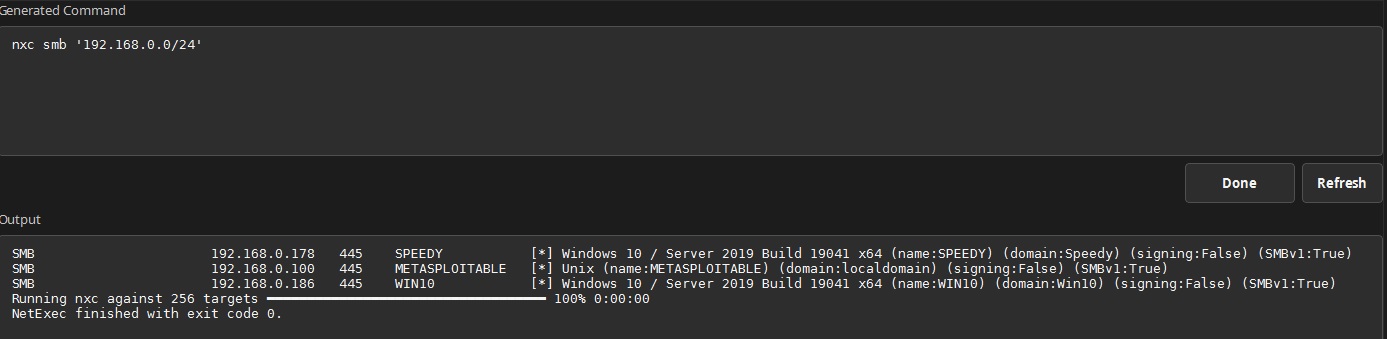
NetExec, which continues the CrackMapExec project lineage, has a dedicated workspace in CoordOps alongside tools such as Impacket, Certipy, Coercer, Kerbrute, BloodHound CE, Responder, and LDAP Query. Operators can configure and run NetExec without leaving the engagement or repeatedly rebuilding complex commands by hand.
The interface starts with the target range from the active CoordOps session, helping operators remain aligned with the engagement scope. A target is required before execution, but it can be refined to an individual address, hostname, range, or CIDR block for a specific operation.
The interface supports SMB, LDAP, SSH, WMI, RDP, NFS, FTP, MSSQL, VNC, and WinRM targets. Authentication controls include usernames and passwords, NTLM hashes, Kerberos, AES keys, domain and KDC settings, local authentication, and continued execution after a successful login. Runtime controls cover threads, timeouts, jitter, DNS behavior, logging, IPv6, and additional native NetExec arguments.
CoordOps adjusts the available controls to match the selected protocol. SMB-specific enumeration and credential options appear for SMB operations, LDAP-specific discovery controls appear for LDAP operations, and command-execution controls are available only for protocols that support them. This keeps the workspace focused while still exposing the underlying NetExec capabilities.
For SMB enumeration, CoordOps exposes share, session, disk, user, group, password-policy, RID, SAM, LSA, NTDS, DPAPI, and LAPS operations. Operators can search shared folders by filename or content, choose an execution method, suppress command output when appropriate, and configure command or PowerShell execution.
The LDAP workflow includes AS-REP roasting, Kerberoasting, delegation and adminCount discovery, gMSA password collection, domain SID retrieval, domain-controller discovery, BloodHound collection, and custom LDAP queries. Collection options allow the operator to select an appropriate BloodHound collection scope for the engagement.
A dedicated module section provides access to commonly used NetExec modules, including checks and workflows for NoPAC, ZeroLogon, PetitPotam, coercion, MS17-010, credential collection, share spidering, and related operations. Module-specific options can be supplied without losing access to NetExec’s general additional-argument field.
Built-in recipes provide starting points for common workflows such as null-session share enumeration, SMB-signing sweeps, LDAP user discovery, Kerberoasting, and SAM collection. Applying a recipe fills in the protocol, example target, and required arguments, which operators can then review and adapt to the authorized environment.
Every control change rebuilds the underlying nxc command in a visible, read-only preview so operators can review exactly what CoordOps will execute. The command runs through the same managed execution workflow used by other CoordOps tools, with streamed output, a visible completion state, exit-code reporting, and the ability to stop an operation that is still running.
Existing NetExec logs can also be imported and parsed without rerunning the original command. CoordOps validates that the selected file contains recognizable NetExec output and reports an error when the log cannot be interpreted, preventing an unrelated file from appearing as a successful import.
NetExec output is more than terminal text inside CoordOps. Parsed host and service details are merged into the engagement inventory, discovered shares are recorded, and observations such as disabled SMB signing or enabled SMBv1 are added to the session’s Active Directory assessment data. This keeps enumeration results available to the rest of the engagement rather than leaving them isolated in a console transcript.
Credential safety is handled deliberately. Passwords, NTLM hashes, AES keys, and credentials echoed by NetExec are redacted from the visible command preview, execution output, audit events, screenshots, and downstream automation logs. Operators retain the power and transparency of the underlying tool while CoordOps keeps its results organized, reviewable, and ready for reporting.
CoordOps also avoids silently downloading NetExec onto an operator’s workstation. The interface uses the approved nxc executable available in the operator-managed tool environment or an approved NetExec distribution placed with the CoordOps tools. A custom executable path can be selected when an engagement requires a specific installation or version.
This combination makes the NetExec workspace more than a graphical command builder. It connects protocol-aware configuration, controlled execution, secure output handling, historical log ingestion, and structured engagement data in one repeatable workflow.