CoordOps Console Features
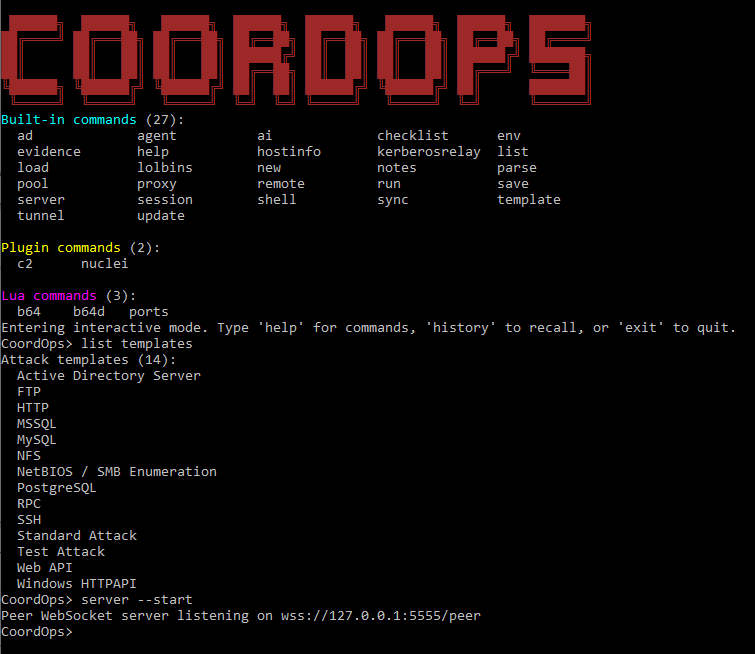
The CoordOps Console is a fast, self-contained CLI wrapper for CoordOps with rich interactive and scripted operation. From Lua scripting to Node-RED visual automation, discover how the console streamlines your red team workflows.
Foundation
Core CLI Experience
CLI Architecture
Fast, self-contained command-line interface:
- Multiple run modes: standard interactive, local Spectre UI, argument mode, Node-RED automation
- Context-aware command mode turns any command into a scoped "context shell"
- Built-in command history with cursor navigation and tab completion
Interactive Modes & UX
Rich interactive experience:
- Classic interactive mode with inline help, context guidance, and suggestions
- Local Spectre UI mode with command menu, history recall, and styled output
- Command context guardrails prevent cross-context confusion
- Built-in help aliases (help / ? / ls) with curated command summary
Project Organization
Session Lifecycle
Session Management
Complete session control from the CLI:
- Create sessions with name, target host/range, and password prompts
- Load sessions locally from disk or remotely from an CoordOps server
- Save sessions to disk for offline use
- Host info lookup to print per-host services within a loaded session
Session Data & Logs
Data persistence for automation:
- Session data remains available for scripted workflows
- Plugin access to session context and execution logs
- List session to display loaded session context and live hosts
- Remote session sync with CoordOps server integration
Execution
Command Execution & Automation
Command Execution
Flexible command execution options:
- Execute CoordOps command library entries by name
- Execute raw custom OS commands as one-offs (no session history required)
- Template attack execution with target/port resolution
- Built-in list capabilities for commands, templates, plugins, connections, Lua
Batch Automation
Script-driven automation:
- RunScript for multi-line CoordOps command files
- Batch automation via scripted command sequences
- Argument mode for non-interactive scripted execution
- Template attacks with automated target resolution
Shell Access
Local & Remote Shell Control
Local Shell
Native shell integration:
- Local shell launcher (cmd, PowerShell, bash, sh) with session tracking
- Built-in directory change handling (cd) and exit controls
- Session-aware execution for local commands
- Cross-platform support for Windows and Linux environments
Remote Shell
WebSocket-based remote execution:
- Remote shell mode over WebSocket with persisted working directory
- Execute single remote commands via shell --cmd
- Per-session working directory persistence
- Secure WebSocket communication with TLS
Remote Control
WebSocket Server & Remote Control
WSS Server
Built-in secure WebSocket server:
- Built-in WSS server with TLS certificates auto-generated from license
- Challenge/response authentication with HMAC proof and nonce validation
- Session join/leave broadcasting and multi-client session rooms
- Heartbeat keep-alive responses for client liveness
Connection Management
Full control over remote clients:
- Live command execution routing for remote clients
- Start/stop server with connection management
- Close specific connections or list active clients
- List connections to view active WebSocket clients
Data Transfer
File Transfer & Loot Handling
File Transfer
Secure file streaming:
- file --copy streaming from server loot directory to remote clients
- Chunked transfer with hashes and transfer completion signaling
- Safe path resolution (absolute or relative to LootDir or shell working directory)
- Local interactive file browser for quick file selection (Spectre mode)
Operational Introspection
Visibility into your environment:
- list --commands to view command library by category
- list --templates to view available template attacks
- list --connections to view active WebSocket clients
- list --session to display loaded session context and live hosts
Extensibility
Plugin System & Lua Scripting
DLL Plugin System
Extend with custom plugins:
- Dynamic plugin loader for external DLLs implementing OptionsBase
- Plugin commands auto-registered into the CLI
- Plugin discovery and visibility via list --plugins
- Full API access to session context and execution
Lua Scripting
Embedded MoonSharp Lua runtime:
- Hard-sandbox execution for safe script running
- Auto-load Lua scripts from Plugins/Lua at startup
- Host API for command registration, options, completions, session access
- Lua command discovery via list --lua, grouped by script file
Lua Integration
Lua Host API & Lifecycle Hooks
Host API Functions
Full integration capabilities:
- host:register_command to add custom CLI commands
- host:register_option to define command options
- host:add_completion for tab completion support
- host:session_id, host:get_session_data, host:exec, host:log
Lifecycle Hooks
Advanced automation hooks:
- init for script initialization
- on_prompt, on_input_changed for interactive feedback
- on_before_execute, on_after_execute for command interception
- on_output, on_error, on_command_invoke, on_complete
Included Plugins
Lua Workflow & Recon Plugins
Workflow Automation
Pre-built workflow automation:
- Pre-built workflows: initial recon, post-exploit, lateral movement prep
- Custom workflow creation via wf-create --name --steps
- Workflow execution and progress reporting
- Intelligent completions for workflow names and parameters
Recon Helper Plugin
Quick enumeration commands:
- quick-enum (network/web/SMB/full), scan-range, extract-info
- Argument parsing helpers and command audit logging
- Smart completions for common CIDRs and enum types
- Session-aware context for all recon operations
Notes Plugin
Track findings and credentials:
- Quick notes, credentials, targets and findings tracking
- Session-aware context and one-command export view
- Severity completions for findings
- Organized data collection throughout engagements
Shortcuts Plugin
Quick reference and utilities:
- Common port reference for quick lookups
- Loot location cheatsheet for engagement data
- Privesc checklist for privilege escalation
- Base64 encode/decode helpers built-in
Visual Automation
Node-RED Automation Integration
Node-RED Integration
Visual workflow automation:
- Integrated Node-RED startup mode (nodered) for visual workflow automation
- Embedded Node-RED package for visual CoordOps workflows
- Admin endpoints for live Windows and Linux tool metadata
- WebSocket manager with queueing and reconnect logic
Custom Node-RED Nodes
Purpose-built automation nodes:
- Linux command node: pick commands from tools.json with dynamic fields
- Windows command node: pick commands from tools_win.json
- Custom command node: send arbitrary CLI commands with a connection test
- Session and instruction nodes for creating, loading, and directing an engagement
Security
Security & Reliability
Security Features
Enterprise-grade security:
- License-bound startup and TLS key derivation for server mode
- WSS-only remote server with TLS 1.2/1.3 enforcement
- Nonce-based auth prevents replay attacks
- Rate-limit style protection for invalid message types
ASCII Banner & UI
Professional console experience:
- ASCII splash banner and consistent console UI helpers
- Styled output in Spectre UI mode
- Flow outputs for success/error routing to downstream automation
- Progress reporting for long-running operations