CoordOps Client Features
The CoordOps Client is a comprehensive desktop application for red team professionals. From reconnaissance and scanning to AI-assisted reporting, explore every capability designed to streamline your security assessments.
Discovery & Assessment
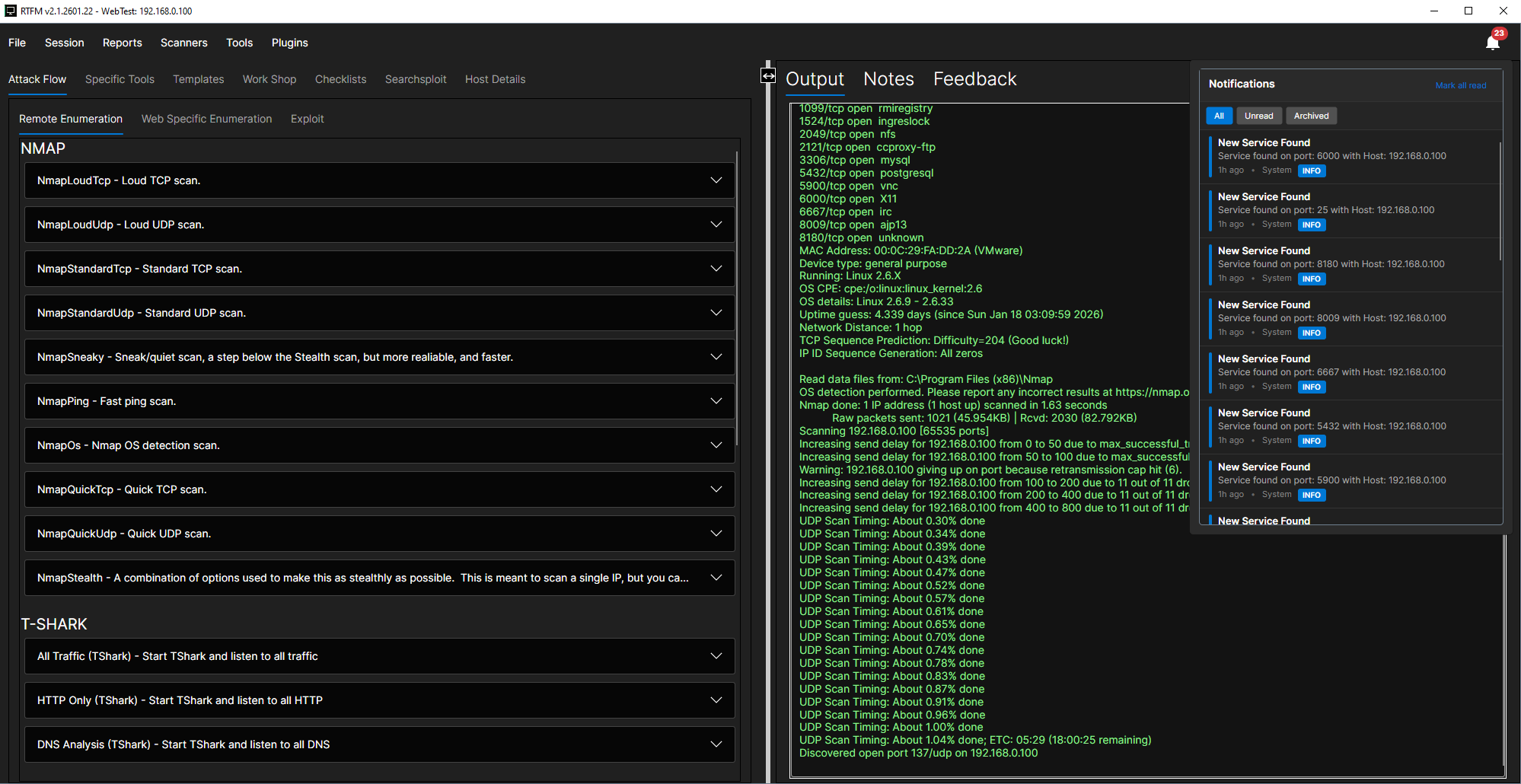
Recon & Scanning Suite
Full-Stack Recon Suite
Comprehensive asset discovery and vulnerability scanning:
- Nmap integration for port scanning and service detection
- Nuclei templates for fast vulnerability scanning
- OpenVAS/GVM for comprehensive vulnerability assessments
- Ping Scanner for rapid host discovery across subnets
Live Network Monitor
Real-time network visibility and host management:
- Interface selection for targeted monitoring
- Live host/service discovery as they appear on the network
- Add new hosts to scope with one click
- Network Mapping view for visual topology representation
ZAP Proxy Integration
Web application scanning with full control:
- Scope controls to limit scanning to target domains
- Auth options for authenticated scanning
- Crawler and active scan stages with progress tracking
- Findings summary and URL details view
Injection & Fuzzing Tools
Specialized testing for common vulnerabilities:
- Dalfox for XSS vulnerability detection
- SQLmap for SQL injection testing
- Wfuzz for high-volume fuzzing and brute forcing
Application Testing
Web & API Security
OpenAPI Endpoint Viewer
Navigate and test APIs with ease:
- Searchable endpoints with method filters (GET, POST, PUT, DELETE)
- Per-endpoint details including parameters and schemas
- Built-in auth modes (API key, bearer, basic) for rapid testing
- One-click send to Wfuzz or SQLmap for instant testing
API Fuzzing & Testing
Modern API security testing tools:
- RESTler for stateful REST API fuzzing
- Schemathesis for property-based API testing
- ZAP URL details for deep dive request/response inspection
Guided Methodology
Attack Flow & Tooling Hub
Guided Attack Flow
Structured tabs for each pentest phase:
- Remote Enumeration with Nmap, tshark, tcpdump, DNS, web/SNMP tools
- Web Enumeration using Nmap, Dirb, Gobuster
- Exploit tracks with categorized attack paths
- Templates tab for reusable playbooks and standardized execution
Command Library
Curated commands grouped by category:
- Categories: enum, vuln scan, exploit, web, stress test, forensics
- More categories: wireless, sniffing/spoofing, password, maintaining
- Advanced: reverse shells, reporting, hardware, dynamic analysis
Workshop Hub
Built-in utilities for common pentest tasks:
- CME runner for CrackMapExec operations
- CeWL wordlist creator for custom wordlist generation
- Reverse shell generator with multiple payload types
- Code snippets library for quick reference
SearchSploit & Host Details
Exploit research and target management:
- SearchSploit integration with searchable exploit database
- Exploit detail preview without leaving the app
- Host Details view with services inventory
- OS/MAC/subnet fields and host-specific notes
Session Management
Operational Workflow
Session-Centric Workflow
Organize every engagement under one umbrella:
- New/open/save sessions for easy project management
- Local or remote sessions with flexible storage options
- Session settings for target ranges, credentials, and notes
- Drag-and-drop file uploads with descriptions and progress feedback
Remote Operations
Connect and manage remote infrastructure:
- Remote session connectivity with host login and session list
- Remote Consoles manager with WebSocket endpoints
- Live connection status and channel management
- SSH Tunnel Manager for operational control
Command Execution
Execution & Data Capture
Command Execution Control
Full control over command execution:
- Arguments and host targeting for precise execution
- Parser selection for structured output processing
- Output file tracking and cancel controls
- Output, Notes, and Feedback tabs with context actions
Process Logs & Notifications
Track everything that happens:
- Parser window with drag-and-drop or paste input
- Process Logs dashboard with console/cancel actions
- PDF export for process log documentation
- Notification center with unread badge and quick actions
Documentation
Reporting & Knowledge
Checklist Management
Guided methodology with full documentation:
- Guided steps with commands, code blocks, and notes
- Searchable checklist names for fast navigation
- Supporting detail panels for context and evidence
- Checklist Report with PDF export for executive summaries
Reports & Visualization
Professional deliverables and insights:
- Command Report with full output capture and PDF export
- Mindmap view to visualize scope and relationships
- Host and findings relationships mapped visually
Intelligent Assistance
AI Assistant
Multi-Provider AI Support
Choose your preferred AI provider:
- OpenAI integration for cloud-based AI assistance
- Ollama for local LLM support with full privacy
- LM Studio for on-premise AI workflows
- Model selection for default and instruction models per provider
AI Chat & Logging
Contextual assistance with full traceability:
- Built-in AI Agent/Chat for contextual assistance
- Connection test and status indicators for each provider
- Secure API key inputs for safe credential storage
- AI logs for traceability and auditability
Customization
Extensibility & UX
Plugin System
Extend CoordOps with custom functionality:
- Dynamic discovery and loading of DLL plugins
- Avalonia plugin support for UI component customization
- OCR tool for extracting text from screenshots and documents
Modern Desktop UX
Professional-grade interface:
- Dockable windows for a modular, multi-panel workspace
- Multi-tab, split-pane UI for rapid context switching
- Polished Avalonia client for desktop-grade performance