Reverse Shell Library: Reusable, Searchable Shell References in CoordOps
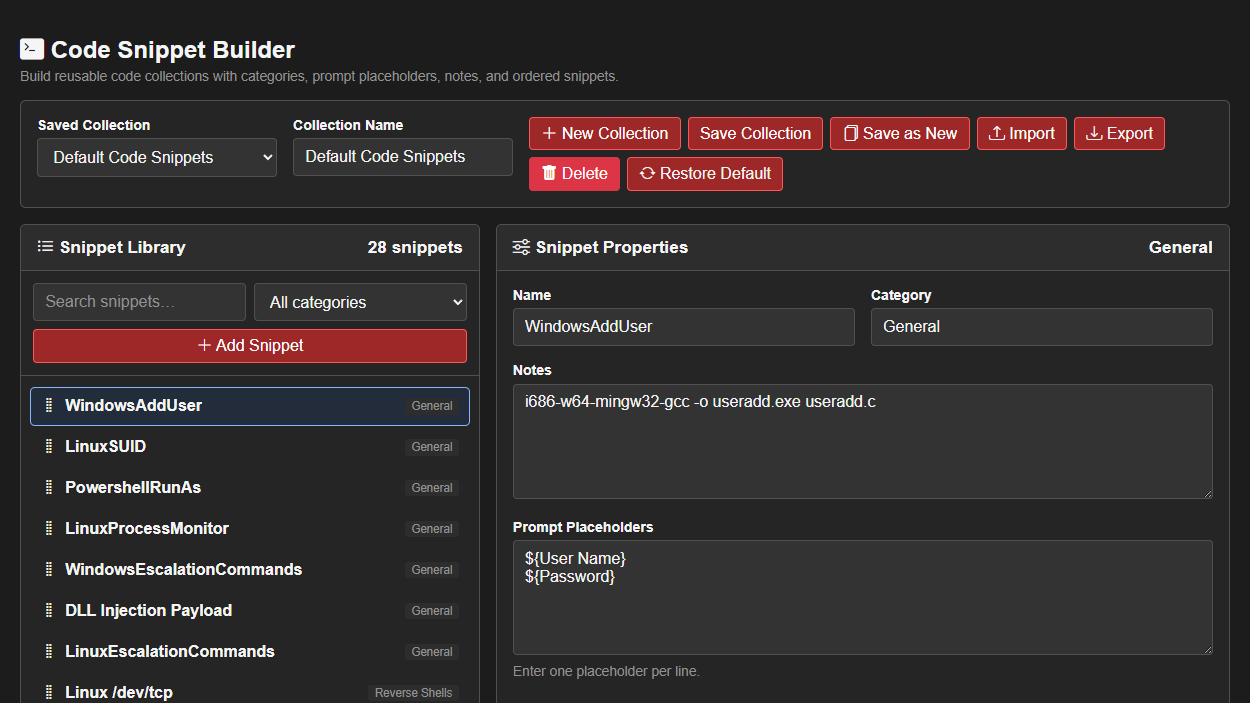
Finding the right reverse-shell syntax during an engagement often means searching old notes, scrolling through terminal history, or reopening the same external reference. CoordOps brings that material into a centrally managed Code Snippet Builder where teams can maintain approved reverse-shell references and other reusable operator snippets in one organized library.
The library is collection-based rather than a single hard-coded list. Teams can retain the built-in collection, create organization-specific collections, or save a modified library under a new name without replacing the shared original. Individual snippets can be added, edited, deleted, reordered, searched, and filtered by category, making it practical to separate reverse shells from privilege-escalation references, administration commands, payload templates, or other operational material.
Each entry contains more than a name and a command. Snippets support a category, detailed notes, reusable code, and a list of prompt placeholders. Quick-insert controls make common values such as ${target}, ${port}, ${User Name}, and ${Password} explicit parts of the template instead of burying environment-specific values inside copied commands.
This structure helps teams document how a snippet is intended to be used. Notes can identify the expected operating system, shell or interpreter, prerequisites, limitations, and validation status. Operators can distinguish a reviewed organizational reference from an untested example rather than treating every copied one-liner as equally reliable.
Search and category filtering keep larger libraries usable, while manual ordering lets collection owners place frequently used or preferred entries where operators can find them quickly. The editor also includes line-numbered code editing, visible unsaved-change tracking, and validation to catch malformed collections or duplicate snippet names before they are stored.
Collections can be imported and exported as JSON for review, backup, migration, or controlled distribution between CoordOps Server installations. Administrators can also restore the packaged defaults when they need a clean reference point. Importing a collection does not silently replace existing data: it is loaded for inspection and must be deliberately saved.
The Reverse Shell library is intentionally a reference-management feature, not an automatic payload launcher or listener manager. Viewing or saving a snippet does not execute it, open a listener, or deploy anything to a target. That separation keeps the library useful for preparation and collaboration while leaving execution under the operator’s explicit control.
It is a focused feature built around a common operational problem: important commands are only useful when they can be found, understood, reviewed, and adapted safely. By keeping those references inside CoordOps, teams can spend less time searching for syntax and more time maintaining a consistent, accountable engagement workflow.